The 80s pad behind a synthwave track, the wobble in a dubstep drop, the warm bass in a lofi beat and the bright arpeggio in a video game theme all come from the same kind of instrument: the synthesizer. It sounds like a complicated studio machine, but the idea underneath it is simple, and once you get that idea you can hear how almost any electronic sound was made. Here is what a synthesizer is, how it makes sound, the main types of synths, and which ones are the easiest to start on.
The short answer
A synthesizer is an electronic instrument that creates sound from scratch instead of playing back a recording. An oscillator makes a raw tone, a filter shapes its brightness, and an amplifier with an envelope shapes how it starts and fades. The main types (subtractive, FM, wavetable, additive, granular, sample-based and modular) are just different ways of making and shaping that tone. For beginners, a small, affordable synth you can carry around and play every day beats a big expensive one that sits under a cover.
- What is a synthesizer?
- A very short history
- How a synthesizer makes sound
- Types of synthesizers
- Mono, poly and paraphonic
- Analog vs digital synths
- Synthesizer vs keyboard
- Best synthesizers for beginners
- Full disclosure: this one is ours
- Synthesizer FAQ
What is a synthesizer?
A synthesizer (synth for short) is an instrument that generates sound electronically and lets you shape it with controls. A piano makes sound by hitting strings; a guitar by plucking them. A synth starts with an electrical signal, a vibration that only exists as voltage or as numbers in a chip, and sends it to a speaker.
What makes it a synthesizer rather than just an electronic beeper is that the sound is built up from parts you can change. Turn one knob and the tone goes from dark to bright. Turn another and a short pluck becomes a slow swell. Turn a third and the note starts to wobble. The same box can play a deep bass, a glassy bell, a string section or a laser zap, because you are building the sound rather than choosing a recording of it.
Synths come in every shape: keyboards, small desktop boxes with no keys, racks of modules connected with cables, pocket gadgets, and software that runs inside a music app on a laptop. The shape changes, but the building blocks are the same.
A very short history
Electronic instruments go back over a century, but the synth as most people picture it started in the 1960s. Robert Moog's first commercial synthesizer appeared in 1964. It was modular: separate oscillators, filters, amplifiers and envelope generators joined with patch cables, all controlled by voltage. Wendy Carlos's 1968 album Switched-On Bach brought it to a mass audience, and in 1970 the Minimoog squeezed the idea into a portable instrument with no cables needed.
Digital synths took over the 1980s. Yamaha's DX7 (1983) used FM synthesis, a technique developed by John Chowning at Stanford, and became one of the best-selling synthesizers ever made; its electric piano preset is all over 80s pop. Today most synths are digital, many are software, and the classic analog designs are still being built and copied.
| Year | Milestone |
|---|---|
| 1964 | The first commercial Moog synthesizer (modular, voltage controlled) |
| 1968 | Wendy Carlos's Switched-On Bach makes the Moog famous |
| 1970 | The Minimoog: a portable, all-in-one synth |
| 1983 | Yamaha DX7 brings FM synthesis to the mainstream |
| Today | Software synths, small affordable hardware, and pocket synths |
How a synthesizer makes sound
Almost every synth, from a 1970s Moog to a free plugin, follows the same path. Learn these five parts and every synth panel stops looking scary.
- Oscillator: the raw tone. It vibrates at the pitch of the note you play. Its waveform sets the basic character: a sine wave is pure and soft, a triangle a little brighter, a square hollow and reedy (think old game consoles), and a sawtooth bright and buzzy (the classic brass, strings and synthwave lead). Many synths stack two or more oscillators slightly out of tune for a thicker sound.
- Filter: the brightness. A low-pass filter removes the high frequencies above its cutoff, so turning the cutoff down makes the sound darker and more muffled. Resonance boosts the frequencies right at the cutoff, which gives that squelchy, vocal "wow" sound. High-pass, band-pass and notch filters cut different parts of the spectrum.
- Amplifier: the volume. It controls how loud the sound is at each moment, which is what makes a note start and stop.
- Envelope: the shape over time. An envelope is a one-shot movement that runs every time you press a key, usually in four stages called ADSR (below). Sent to the amplifier, it decides whether a note is a short pluck or a slow pad. Sent to the filter, it makes each note open up and close down.
- LFO: the wobble. A low-frequency oscillator vibrates too slowly to hear as a note, so instead it moves another control up and down. On pitch it is vibrato, on volume it is tremolo, and on the filter cutoff it is the "wub" in a wobble bass.
That is the whole recipe for a huge range of sounds. A fat bass is a sawtooth with the filter mostly closed. A pluck is a fast envelope on the filter and amp. A pad is a slow attack, a long release and some chorus. An acid line is a square or saw with high resonance and a short filter envelope. If you want to go deep, Gordon Reid's 63-part Synth Secrets series in Sound On Sound is still one of the best free explanations ever written.
Types of synthesizers
"Type" can mean two different things: how the synth makes its sound (the synthesis method) and what kind of hardware it is. Here are the synthesis methods first. Many modern synths mix several.
| Type | How it works | Sounds like |
|---|---|---|
| Subtractive | Start with a bright, harmonically rich wave and filter parts of it away | Classic analog basses, brass, pads, leads |
| FM | One oscillator wobbles the pitch of another very fast, creating new harmonics | Electric pianos, bells, metallic plucks, punchy basses |
| Wavetable | Plays through a table of different single-cycle waves and sweeps between them | Moving, evolving tones; modern EDM basses and leads |
| Additive | Builds a sound by adding together many sine waves at different pitches and levels | Organs, clear tones, precise and glassy textures |
| Granular | Chops audio into tiny grains and rearranges, stretches and layers them | Shimmering clouds, textures, ambient drones |
| Sample-based | Plays back recordings of real instruments, then shapes them like a synth | Realistic pianos, strings, choirs, drums |
| Physical modeling | Simulates the physics of a string, tube or surface in software | Plucked strings, flutes, mallets that react like real ones |
Subtractive, analog and virtual analog
Subtractive synthesis is the oscillator, filter and amplifier path above, and it is the best place to start because most other synths borrow its controls. When people say "analog synth" they usually mean a subtractive synth built with analog circuits. A virtual analog synth uses digital code to model that same path, often with extras like more voices or effects.

FM synthesis
Frequency modulation uses one oscillator to modulate the pitch of another at audio speed. The result is hard to predict from the knobs, which gave FM a reputation for being difficult, but it produces bright, bell-like and percussive tones that subtractive synths struggle with. It is the sound of the Yamaha DX7 and a lot of 80s and 90s pop and game music.

Wavetable synthesis
A wavetable synth stores a series of different waveforms and lets you scan through them, often with an envelope or LFO, so the tone keeps morphing. It is the backbone of many modern bass and lead sounds in EDM. Vital is a popular wavetable synth with a free version that includes the full synth, so it is an easy way to try it.
Granular, additive and sample-based
These three are more specialized. Granular is the ambient producer's favorite for turning any sound into a texture. Additive gives precise control over every harmonic. Sample-based synths (sometimes called romplers) are what most keyboards and phone music apps use for realistic instrument sounds.
Modular and semi-modular
This is a hardware type, not a synthesis method. A modular synth is a case of separate modules (oscillators, filters, envelopes and so on) that you connect with patch cables, just like the original Moog. Nothing is wired by default, which makes it endlessly flexible and also the most expensive and confusing way to start. A semi-modular synth comes pre-wired so it makes sound with no cables, but has patch points to reroute things when you are ready. Most beginners are better served by an all-in-one synth first.

Mono, poly and paraphonic
One more spec you will see everywhere is how many notes a synth can play at once.
- Monophonic: one note at a time. Great for basses and leads, and why classic acid and many famous lead lines sound the way they do. Play a new note and the old one stops.
- Polyphonic: several notes at once, each with its own full path through filter and amp. The number of voices is how many notes it can hold. You need this for chords and pads.
- Paraphonic: several oscillators can play different notes, but they share one filter and sometimes one envelope. It plays chords, but every note in the chord opens and closes together.
Analog vs digital synths
An analog synth makes its sound with electronic circuits: real voltages moving through real components. Small imperfections, like oscillators drifting slightly out of tune, give it a warmth many players love. A digital synth calculates its sound with a processor, which makes it cheaper to build, easier to fit with lots of voices and effects, and able to do things analog circuits cannot, like FM, wavetables and granular.
For a beginner, this matters much less than the internet suggests. Good digital synths can sound wonderful, and many popular instruments are hybrids: Arturia's MicroFreak, for example, pairs digital oscillators with an analog filter. Pick the instrument that you will actually want to play, then worry about what is inside it.
Analog if you want
- Classic warm subtractive tone
- Hands-on knobs for every control
- Slight drift and character
- Instruments that hold their value
Digital if you want
- More voices for less money
- FM, wavetable and other methods
- Built-in effects and presets
- Small, light, often battery powered
Synthesizer vs keyboard
The words get mixed up because many synths have keys and many keyboards make electronic sounds. The difference is control. A home keyboard or digital piano is mostly about playing preset sounds well, often with built-in rhythms and lessons. A synthesizer is about shaping the sound itself, with controls for oscillators, filters, envelopes and modulation. And a synth does not need a keyboard at all: plenty are desktop boxes played with a sequencer, buttons, a stylus or a separate MIDI keyboard.
If your goal is to learn piano pieces, get a keyboard with weighted keys. If your goal is to make the sounds in electronic music, get a synth.
Best synthesizers for beginners
The best first synth is one that is immediate (it sounds good the moment you switch it on), hands-on (you can change the sound without menus), and small enough to keep nearby, because the synth you pick up every day teaches you more than the one you set up on weekends. These are well-loved starting points across a range of budgets.

Stylophone S-1
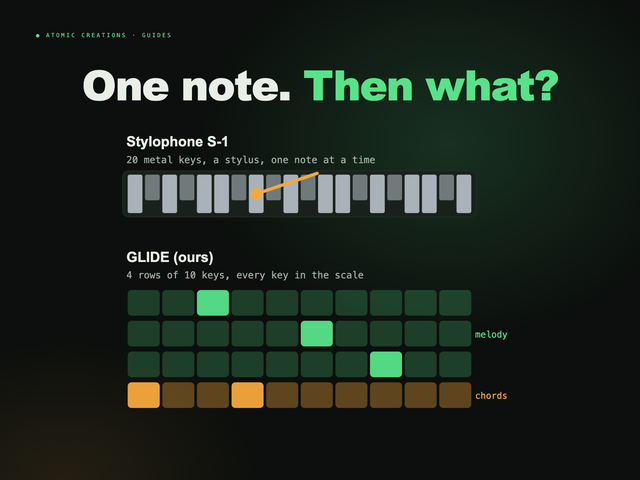
Cheapest way inThe original Stylophone dates back to 1968, and the S-1 is the modern remake: you play it by touching a stylus to a metal keyboard, with a built-in speaker and a headphone jack. It is one note at a time with very little sound shaping, so think of it as a fun toy rather than a full synth. The maker lists it at £29.95.

Teenage Engineering Pocket Operators
Pocket, battery poweredPocket Operators are calculator-sized music devices with a speaker and a built-in sequencer, each focused on one job: drums (PO-12 rhythm), bass, leads, a sampler with a built-in mic (PO-33 K.O!), a vocal synth and more. They are cheap, fun and great for learning sequencing, though each one is fairly limited on its own.

Korg volca fm2
FM on a budgetThe volca fm2 is a six-voice FM synth that recreates the sound of the Yamaha DX7 and can load DX7 patches. It has a small touch keyboard, a 16-step sequencer, reverb and chorus, a speaker, and runs on six AA batteries. Simple macro controls make FM much less intimidating. The wider volca range covers analog bass, drums and more.
HiChord
Pocket chord synthThe HiChord is built for people who want to make songs without theory: every button plays a chord in the key you choose, with 30+ instruments, a six-track looper, drum patterns, a mic and USB-C MIDI. It is more of a songwriting tool than a sound-design synth. Aluminum editions are listed at $320 on pre-order.

Arturia MicroFreak
Best all-rounder to learn onThe MicroFreak is a hybrid: 21 digital oscillator modes (including wavetable, granular, physical modeling and sample playback) into an analog filter, up to four paraphonic voices, and a flat 25-key touch keyboard with poly aftertouch. It lets you try almost every synthesis type in this guide on one box. Arturia lists it at $399.

Korg minilogue xd
A real polysynthWhen you want a proper keyboard synth, the minilogue xd is a four-voice analog polysynth with two analog oscillators plus a digital multi-engine (noise, FM and user oscillators), a 16-step polyphonic sequencer and built-in effects. A knob for nearly everything makes it a great place to learn subtractive synthesis properly. It costs a good deal more than the pocket options.

Teenage Engineering OP-1 field
The dream pocket studioThe OP-1 field is a battery-powered synthesizer, sampler and drum machine in one, with a speaker, microphone, effects and even an FM radio. It is beautifully designed and deep, and it is also by far the most expensive instrument on this list, so it is more of a someday instrument than a first one for most people.
GLIDE
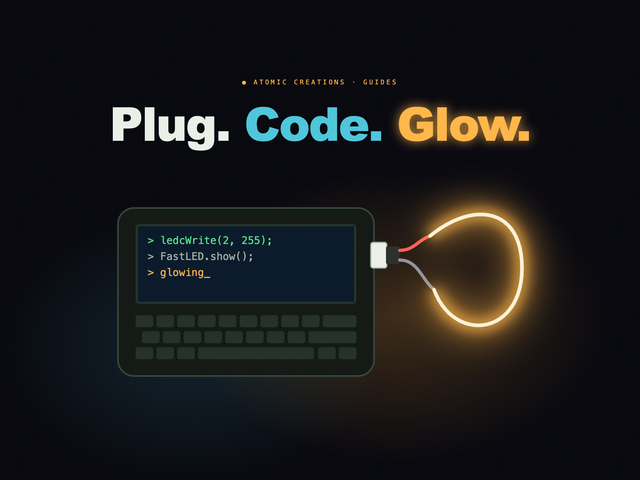
Pocket synthFull disclosure: this one is ours. GLIDE is a pocket synth on the M5Stack Cardputer ADV with a real subtractive engine you can get your hands on: six waveforms, a four-mode filter, ADSR, two LFOs, a mod matrix and built-in effects. Notes slide into each other, scale lock means no wrong notes, and every unit rolls sounds no other device has. More on it below.
Want to start for free? Download a free software synth like Vital and use your laptop keyboard. You will learn the same oscillator, filter and envelope controls, and you will know what you want from hardware before you spend anything. If you want to make full tracks, pair it with our guide on how to make a beat.
Prices checked October 2026 on each maker's own store; where a maker does not list a price, check current retail.
Full disclosure: this one is ours
We built GLIDE because we wanted a synth that was fun the second you pick it up and still deep enough to learn every idea in this guide. It runs on the M5Stack Cardputer ADV, a pocket computer with a small keyboard, and turns those keys into four rows that play like strings: notes glide between pitches instead of snapping, and you can slide a whole chord sideways. Scale lock is on out of the box (A minor pentatonic), so you cannot really hit a wrong note, and holding shift unlocks the notes in between when you are ready.
Here is how the parts of a synth map onto it, so you can hear each one instead of reading about it:
| Synth concept | On GLIDE |
|---|---|
| Oscillator | Six waveforms (sine, triangle, saw, square, a three-saw "fat" wave and PWM), plus a sub-oscillator and noise |
| Filter | Low-pass, high-pass, band-pass and notch, with cutoff, resonance and its own filter envelope |
| Envelope | Full ADSR on the amp, plus a second envelope you can route through the mod matrix |
| LFO | Two LFOs (sine, triangle, saw, square, sample and hold), free or synced to tempo |
| Modulation | A six-slot mod matrix, and a gyro: tilt the device to morph between two sounds or add vibrato |
| Voices | 1 to 8 voices (6 by default), so it plays chords and slides them |
| Effects | Chorus, a tempo-synced delay and reverb |
The part beginners tend to love most: you do not have to build sounds from a blank page. Hit Randomize and it rolls a complete, playable sound in a chosen character (a pluck, a bell, a pad, an acid squelch, a wobble bass and more), or Mutate what you have to nudge it somewhere new, with undo if you go too far. Two of the ten sound slots are generated from a seed unique to your unit, so no two GLIDEs sound alike, and a microSD card stores as many of your own sounds as you like. Hold fn+K near a song and the mic works out its key and tempo, then retunes GLIDE so you can play along with anything.
Honest limits: it is not a drum machine, and it is a pocket instrument with a small keyboard, not a studio workstation. It is a synth you keep on your desk or in your bag and actually play every day, which is how synths get learned. GLIDE is $119.99, built and tested by hand in small batches, and comes with free firmware updates. The next batch drops soon; join the waitlist and you will get the drop email 24 hours before it goes public. You can play it right below, in your browser.
Synthesizer FAQ
What does a synthesizer do?
A synthesizer creates sound electronically and lets you shape it. An oscillator makes a raw tone, a filter changes its brightness, an amplifier and envelope shape how it starts and fades, and modulators like LFOs make it move. That lets one instrument play basses, pads, leads, bells and effects.
Is a synthesizer a keyboard?
Not necessarily. Many synths have keys, but a synth is defined by how it makes and shapes sound, not by its keys. Lots of synths are keyless desktop boxes, modules, pocket devices or software. A home keyboard mostly plays preset sounds; a synth lets you build the sound itself.
What is the easiest synthesizer for beginners?
The easiest synth is one that sounds good the moment you turn it on and has hands-on controls instead of deep menus. Small, affordable synths like a Korg volca, a Pocket Operator or a pocket synth with scale lock are easy places to start, and a free software synth like Vital is a no-cost way to learn the controls.
What are the main types of synthesizers?
The main synthesis types are subtractive, FM, wavetable, additive, granular, sample-based and physical modeling. Synths are also grouped by hardware: analog or digital, and modular, semi-modular or all-in-one. Subtractive is the best one to learn first because most other synths borrow its controls.
Is an analog or digital synth better for beginners?
Either works. Analog synths are prized for warm, slightly imperfect tone, while digital synths usually offer more voices, more synthesis types and built-in effects for less money. Many popular synths are hybrids. For a first synth, how fun and hands-on it is matters more than whether it is analog or digital.
What is the difference between monophonic and polyphonic synths?
A monophonic synth plays one note at a time, which suits basses and leads. A polyphonic synth plays several notes at once, each with its own filter and envelope, so it can play chords and pads. A paraphonic synth plays several notes but shares one filter between them.
Do I need to know music theory to play a synthesizer?
No. You can start by exploring sounds and playing simple riffs by ear. Some synths include scale lock or chord buttons that keep every note in key, so you can make music right away and learn the theory as you go.
Useful? Pass it on
← Browse all guides