Making a beat looks like wizardry until you see what is underneath: a grid, a loop, and a handful of sounds placed in the right spots. This guide walks through your first beat from an empty project to a loop you are proud of, using free tools and no prior experience.
The short answer
Pick a tempo, put a kick on beats 1 and 3 and a snare on 2 and 4, add hi-hats on every eighth note, then layer a bassline and a four-chord loop on top. Loop it for eight bars, add a melody, and arrange it into sections. Free apps like BandLab and GarageBand are all you need to start.
- What you need
- Step 1: pick a tempo
- Step 2: kick and snare
- Step 3: hi-hats and groove
- Step 4: the bassline
- Step 5: chords
- Step 6: a melody or hook
- Step 7: turn a loop into a track
- Step 8: quick mixing tips
What you need
Just a computer or phone and a program for making music, called a DAW (digital audio workstation). Good places to start:
- BandLab: free, runs in a web browser and on phones.
- GarageBand: free on Mac, iPhone and iPad.
- FL Studio, Ableton Live, Logic Pro: paid, with trials. FL Studio is especially popular for hip hop and trap.
The steps below work the same in all of them. Every DAW has a step sequencer or piano roll: a grid where time runs left to right and you click to place notes.
Step 1: pick a tempo
Tempo is measured in BPM (beats per minute) and sets the whole mood. Typical ranges:
| Style | Typical tempo |
|---|---|
| Lo-fi, boom bap hip hop | 70 to 95 BPM |
| Pop, R&B | 90 to 120 BPM |
| House | 118 to 128 BPM |
| Trap | 130 to 160 BPM, felt at half speed |
| Drum and bass | 160 to 175 BPM |
Step 2: kick and snare
Most beats are in 4/4: four beats per bar, and each beat split into four steps, so one bar is a 16-step grid. The kick drum is the low thump, the snare is the crack. The classic starting point is kick on beats 1 and 3, snare on beats 2 and 4:
Loop that and nod along: you already have a beat. Now move one kick a step earlier or later and listen to how the feel changes. That small experiment is most of what beat making is.
Step 3: hi-hats and groove
Hi-hats keep time between the kick and snare. Put one on every other step (eighth notes) as in the grid above. Then make it human:
- Vary the volume. Make every second hat a little quieter so it breathes.
- Add swing. Most DAWs have a swing or shuffle knob that delays every other step slightly. A little swing is the difference between stiff and funky.
- For trap, switch to sixteenth-note hats and add quick rolls (triplets or 32nd notes) at the end of a bar.
Step 4: the bassline
The simplest bassline that always works: play the root note of each chord, and line its rhythm up with the kick. When the kick and bass hit together, the beat feels solid. In trap and modern hip hop, a long tuned 808 often plays the kick and bass at once.
Step 5: chords
Four chords, one per bar, looped. That is all most beats need. Start with one of the common chord progressions: vi-IV-I-V in C is Am F C G. Pick a soft sound like keys or a pad so it sits behind the drums.
Step 6: a melody or hook
A short, repeated phrase on top gives the beat its identity. The easy way to write one: use only the notes of the pentatonic scale for your key, keep it to three or four notes, and repeat it with one small change the second time. Leave space. The best hooks are often simpler than you expect.
Step 7: turn a loop into a track
An eight-bar loop is a beat; a track needs sections. Duplicate your loop across the timeline, then build contrast by taking things away:
- Intro: just the chords or melody, no drums.
- Verse: drums and bass, chords low, space for a vocal.
- Hook: everything in, maybe an extra melody layer.
- Break: drop the kick for four bars, then slam it back in.
Step 8: quick mixing tips
- Get the kick and snare loudest, then bring everything else up around them.
- Keep the low end clean. Cut the bass frequencies from everything except the kick and bass with an EQ.
- Check on bad speakers. Phone speakers and earbuds show you what most listeners will hear.
- Take breaks. Your ears get used to a sound after a while; fresh ears catch problems instantly.
Sketch the melodic half in your pocket
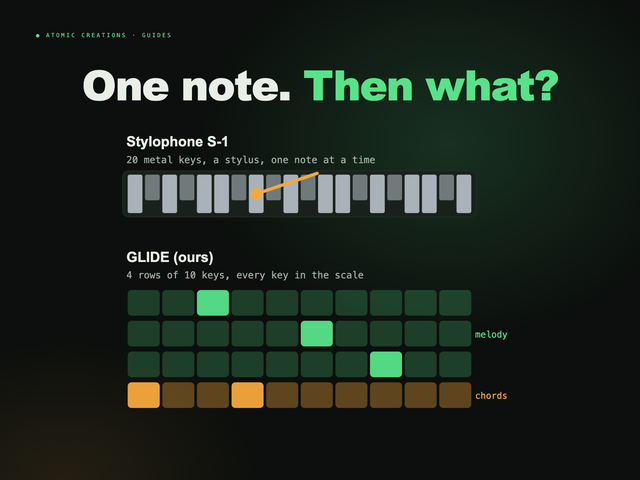
Ideas rarely arrive when you are at the computer. GLIDE, the pocket synth we make, is built for catching them: loop a chord progression on its bottom row, play a melody over it with scale lock keeping every note in key, and record the phrase with its one-button looper. A metronome locks to the same tempo. It does not make drums, so it is a companion to your DAW rather than a replacement, but it is a fast way to find the chords and hook before you sit down to build the beat. The browser version below even has a simple beat to play along with.
Useful? Pass it on
← Browse all guides