An ESP32 and a Raspberry Pi look like the same thing: a small green board with pins along the edge. They are not. One is a microcontroller that runs a single program the instant it gets power. The other is a full Linux computer with a desktop, a browser and Python. Pick the wrong one and your weather station eats batteries, or your cyberdeck cannot open a web page. Here is how to choose, project by project, and when a Raspberry Pi 5 is actually worth the money in 2026.
The short answer
Use an ESP32 when the project does one job: read a sensor, drive LEDs, play an instrument, relay radio messages, run on a battery for weeks. It is on instantly, keeps rock-steady timing, sleeps on microamps and costs $10 to $15 for an official dev board.
Use a Raspberry Pi when the project needs a computer: a screen with a desktop, a browser, Python libraries, cameras, SSH or a web server. Get a Pi 5 only when you need its speed (a smooth desktop, heavy browsing, AI, fast NVMe storage). For a terminal-style cyberdeck, a Pi Zero 2 W at $15 or a small-memory Pi 5 is often enough.
- The real difference: microcontroller vs computer
- ESP32 vs Raspberry Pi, side by side
- Which one for your project
- ESP32 vs Raspberry Pi Pico
- ESP32 vs Raspberry Pi Zero 2 W
- ESP32 vs Raspberry Pi vs Arduino
- Which ESP32? S3, C3, C6 and the classic
- When you actually need a Raspberry Pi 5
- Raspberry Pi 5 vs 4
- Raspberry Pi 5 vs a mini PC
The real difference: microcontroller vs computer
An ESP32 is a microcontroller: a processor, memory, WiFi and Bluetooth on one chip, with no operating system. You write a program (in the Arduino IDE, Espressif's ESP-IDF or MicroPython), flash it, and the chip runs that program and nothing else, from the moment power arrives until it is switched off.
A Raspberry Pi (the Pi 5, Pi 4 and Zero 2 W) is a single-board computer. It boots Linux from a microSD card or SSD, then runs as many programs as you like: a desktop, Chromium, a Python script, a web server, all at once. It is a real computer that happens to have pins.
That one difference explains almost everything else:
- Start-up: an ESP32 is running your code in a blink. A Pi has to boot Linux first, and it prefers a clean shutdown rather than having the power pulled.
- Timing: on an ESP32 nothing competes with your program, so pulses, audio samples and radio timing land exactly when they should. On a Pi, Linux decides what runs when, so very tight timing needs extra care or helper hardware.
- Power: an ESP32-S3 in deep sleep draws around 7 microamps. A Pi 5 sitting idle draws roughly 2.6 to 3 watts in independent tests, and 7 to 9 watts flat out.
- Capability: the Pi runs a browser, a desktop, camera software, full Python with its huge library ecosystem, and anything else Linux runs. An ESP32 has around half a megabyte of on-chip RAM (plus optional PSRAM) and does not try.
A good rule: if you can describe the project in one sentence that does not include the word "computer" ("a plant watering timer", "a synth", "a LoRa messenger"), start with an ESP32. If the sentence is "a tiny Linux box", get a Pi.
ESP32 vs Raspberry Pi, side by side
| ESP32-S3 | Pi Zero 2 W | Pi 5 | |
|---|---|---|---|
| What it is | Microcontroller | Linux computer | Linux computer |
| Processor | Dual-core Xtensa LX7, 240 MHz | Quad-core Cortex-A53, 1 GHz | Quad-core Cortex-A76, 2.4 GHz (BCM2712) |
| Memory | 512 KB SRAM, optional PSRAM (e.g. 8 MB) | 512 MB | 1, 2, 4, 8 or 16 GB LPDDR4X |
| Software | One program: Arduino, ESP-IDF or MicroPython | Raspberry Pi OS (Linux) | Raspberry Pi OS (Linux), full desktop |
| Wireless | 2.4 GHz WiFi, Bluetooth LE 5 | 2.4 GHz WiFi, Bluetooth 4.2 | Dual-band WiFi, Bluetooth 5.0, Gigabit Ethernet |
| Start-up | Instant | Boots Linux | Boots Linux |
| Power | 7 µA deep sleep, about 340 mA peak on WiFi transmit | About 350 mA active | About 2.6 to 3 W idle, 7 to 9 W under load; 27 W supply |
| Pins | 45 GPIO, native USB | 40-pin header, 3.3V | 40-pin header, 3.3V, PCIe for NVMe |
| Video out | Small SPI or parallel screens | Mini HDMI | Two 4Kp60 HDMI |
| Price | $15 (official DevKitC-1 N8R8) | $15 | $45 (1GB) to $305 (16GB) |
Specs come from Espressif's ESP32-S3 page and the Raspberry Pi 5 product page. Pi 5 power figures are independent measurements (CNX Software, Jeff Geerling). Prices are official list prices, checked October 2026.
Which one for your project
Here is how we would start eight common maker projects. "Either" rows depend on whether you want the thing itself or a computer that shows you the thing.
| Project | Pick | Why |
|---|---|---|
| Instrument or synth | ESP32-S3 | Plays the moment you switch it on, with steady audio timing and hours on a battery |
| Weather station | ESP32-C3 or C6 | Wakes, reads sensors, sends over WiFi, sleeps on microamps. Add a Pi only if you want a local dashboard |
| Cyberdeck terminal | Pi Zero 2 W or Pi 5 | You want Linux, SSH and a shell. Zero 2 W for battery life, Pi 5 for a smooth desktop and browser |
| Retro gaming | Pi 5 (or Pi 4) | More consoles run well on a Pi. ESP32 handhelds can emulate older 8-bit systems |
| Home automation sensor | ESP32-C6 | Thread and Zigbee radios built in, plus WiFi 6. The hub that collects them is a good Pi job |
| Camera or AI | Pi 5 | Camera software, OpenCV-style Python and machine learning need real RAM and CPU |
| Battery wearable | ESP32-S3 or C3 | Bluetooth LE and deep sleep; a Pi would drain a small battery quickly |
| Mesh radio | ESP32-S3 | Many Meshtastic radios, including the Cardputer mesh kit, are ESP32-S3 based and sip power |
New to mesh radios? Our Meshtastic for beginners guide covers the hardware. Building a portable computer instead? Start with how to build a cyberdeck and our cyberdeck case ideas.
Get an ESP32 if you want
- Instant on, no boot wait
- Long battery life with deep sleep
- Precise timing for audio, LEDs or radio
- One focused job, done reliably
- A $10 to $15 official board
Get a Raspberry Pi if you want
- A desktop, browser and terminal
- Full Python and Linux software
- Cameras, HDMI screens, Ethernet
- Several programs running at once
- A web server or hub for other devices
Many good projects use both: ESP32 sensors around the house, reporting to one Pi that runs the dashboard.
ESP32 vs Raspberry Pi Pico
This is the comparison that trips people up, because the Pico is not a small Raspberry Pi. Raspberry Pi's own microcontroller boards sit in the same category as the ESP32: no Linux, one program, instant on. The current Pico 2 uses Raspberry Pi's RP2350 chip with dual Arm Cortex-M33 or RISC-V cores at 150 MHz and 520 KB of SRAM, and starts from $5. The Pico 2 W adds 2.4 GHz WiFi and Bluetooth 5.2.
- Pick the ESP32 when wireless is the point of the project: its WiFi and Bluetooth tooling is mature, there are variants for every job (below), and there is a huge library of ready-made firmware.
- Pick the Pico for wired projects, very cheap builds and clean pin-level work. Its programmable I/O blocks are popular for driving unusual protocols and LED strips, and Raspberry Pi's documentation is excellent.
ESP32 vs Raspberry Pi Zero 2 W
At $15 each, these are the two most common "small and cheap" choices, and they could not be more different. The Zero 2 W is a real Linux computer: a quad-core Cortex-A53 at 1 GHz, 512 MB of RAM, 2.4 GHz WiFi and Bluetooth 4.2. It runs SSH, Python and light desktop apps, which makes it a favorite for pocket terminals and small cyberdecks.
The trade is power. The Zero 2 W draws about 350 mA while active, around the same as an ESP32-S3 at its WiFi transmit peak, but it never drops to microamps. An ESP32 can sleep between readings; a Zero cannot. So: Zero 2 W for a tiny computer, ESP32 for a device that runs on a battery.
A catch for 2026: the Zero 2 W was not affected by the memory-driven price rises that hit the Pi 4 and Pi 5, but it has been sold out at most stores for months because of a chip substrate shortage. When official US resellers have it, they list it around $17 to $19, and Raspberry Pi says supply should improve after it qualified an extra supplier. Details in our Raspberry Pi price guide.
ESP32 vs Raspberry Pi vs Arduino
Arduino is two things. It is a family of boards, and it is a programming environment. Classic Arduino boards like the Uno are microcontrollers too, simpler and slower than an ESP32, and the classic Uno has no WiFi. They are still great for learning and for simple wired projects.
The useful news is that the ESP32 runs the Arduino environment through Espressif's Arduino core, so most Arduino tutorials and libraries carry over. Many makers learn on an Uno and move to an ESP32 the first time they want WiFi or more speed. The Raspberry Pi is the odd one out of the three: it is the only one that is a full computer.
Which ESP32? S3, C3, C6 and the classic
"ESP32" is a family, and the letter matters. All of them are 2.4 GHz WiFi only.
| Chip | Cores | Wireless | Deep sleep | Best for |
|---|---|---|---|---|
| ESP32 (classic) | Dual Xtensa LX6, 240 MHz, 520 KB SRAM, 34 GPIO | WiFi, Bluetooth 4.2 Classic and LE | 10 µA | Bluetooth audio and Classic devices, older tutorials |
| ESP32-S3 | Dual Xtensa LX7, 240 MHz, 512 KB SRAM, 45 GPIO | WiFi, Bluetooth LE 5 (no Classic) | 7 µA | Screens, audio, USB devices, handhelds; PSRAM options |
| ESP32-C3 | Single RISC-V, 160 MHz, 400 KB SRAM, 22 GPIO | WiFi, Bluetooth LE 5 | 5 µA | Cheap, simple sensors and battery nodes |
| ESP32-C6 | RISC-V 160 MHz plus a low-power core | WiFi 6, Bluetooth LE 5, Thread and Zigbee | 7 µA | Smart home and Matter-style devices |
If you are not sure, start with the ESP32-S3: it has the most headroom, native USB, and is what most modern handhelds use, including the Cardputer ADV. Official dev boards cost about $10 (ESP32-C3-DevKitM-1) to $15 (ESP32-S3-DevKitC-1-N8R8).
When you actually need a Raspberry Pi 5
The Pi 5 is a big jump: a quad-core Cortex-A76 at 2.4 GHz, roughly two to three times the CPU performance of the Pi 4, with PCIe for NVMe SSDs (via the M.2 HAT+, from $12), dual 4Kp60 HDMI, a real-time clock and a power button. It is the first Pi that feels like a comfortable everyday desktop.
It has also become expensive. Raspberry Pi raised prices in December 2025, February 2026, April 2026 and again on October 1, 2026, blaming memory costs, and describes the increases as temporary. The 4GB Pi 5 launched at $60 and now lists at $110; the 8GB went from $80 to $175, and even the 2GB is now $77.50. We cover the details in the Raspberry Pi price increase explained. That makes it worth being honest about which board you really need:
| You want | Good choice | Price |
|---|---|---|
| A sensor, controller, synth or radio | ESP32-S3 or C3 dev board, or a Pico 2 | $5 to $15 |
| A pocket terminal: SSH, Python, a shell | Pi Zero 2 W (when you can find one) | $15 list |
| Pi 5 speed without paying for RAM (headless, servers, a text-first cyberdeck) | Pi 5, 1GB or 2GB | $45 or $77.50 |
| A light desktop on a budget | Pi 4, 2GB or 4GB | $67.50 or $100 |
| A smooth desktop, a browser with many tabs, NVMe | Pi 5, 4GB or 8GB | $110 or $175 |
| Heavy multitasking, big AI models, lots of containers | Pi 5, 16GB | $305 |
| A custom board or a cyberdeck with your own carrier PCB | Compute Module 5 | From $67.50 |
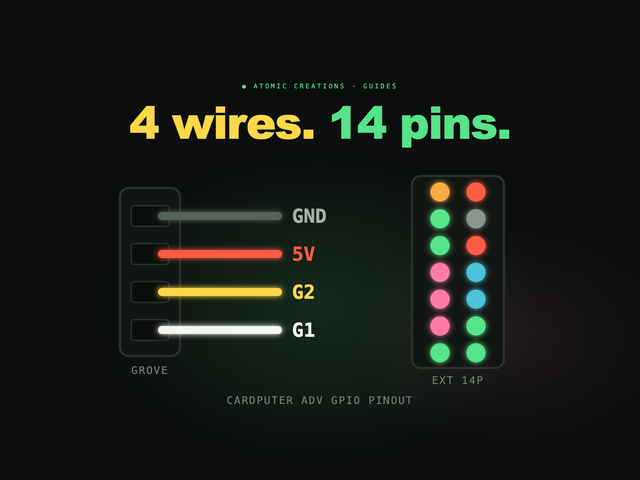
Budget for the extras too. The Pi 5 wants its official 27 W USB-C supply (5V at 5A); on an ordinary 3A supply it limits USB peripherals to 600 mA total, which catches out people running a keyboard, SSD and radio from one deck. It also runs warm: active cooling is recommended, and it throttles at around 80 to 85°C. Its GPIO pins are 3.3V and are not 5V tolerant, same as every Pi. Our Raspberry Pi GPIO pinout guide covers wiring safely.
Raspberry Pi 5 vs 4
At current prices, the gap has nearly closed at 4GB: the Pi 4 4GB lists at $100 and the Pi 5 4GB at $110. For $10 more you get two to three times the CPU speed, PCIe for an NVMe drive, the real-time clock and the power button, so the Pi 5 is the better buy for almost any new project at 4GB and up.
The Pi 4 still makes sense when you already own the accessories (cases, supplies, HATs built around it), when you want the cheapest full-size Pi with 1GB or 2GB ($35 or $67.50), or when a project's power supply and cooling cannot stretch to the Pi 5's needs.
Raspberry Pi 5 vs a mini PC
Once you add the 27 W supply, a cooler, a case and an NVMe drive to an 8GB or 16GB Pi 5, you are in the price range of small x86 mini PCs, which run ordinary Windows or Linux software and usually come with storage and a case included. If all you want is a small desktop computer or a home server, a mini PC is often the better deal in 2026.
The Pi still wins when the project needs the GPIO header, HATs, Raspberry Pi camera modules, low idle power, a board that fits inside a custom enclosure, or Raspberry Pi's long-term documentation and community. That describes most cyberdecks, which is why so many of them are still built around a Pi.
Why a synth is a microcontroller job
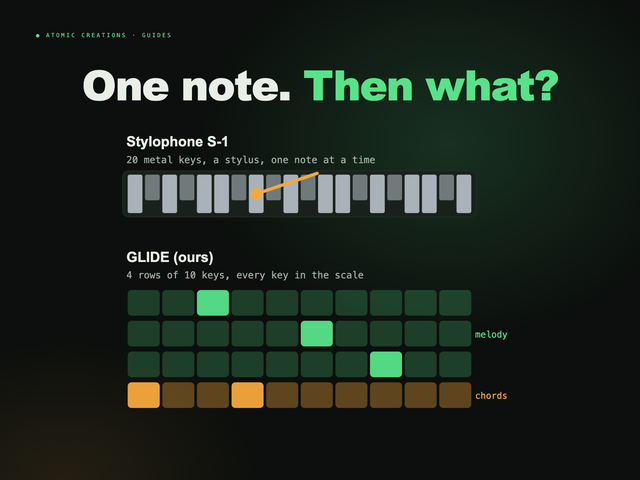
Full disclosure: this one is ours. We make GLIDE, a pocket synthesizer that runs on the ESP32-S3 inside M5Stack's Cardputer ADV, a $29.90 handheld with the keyboard, screen and battery built in. An instrument is exactly the kind of job where a microcontroller beats a computer: it has to play the instant you switch it on, and every note has to land exactly on time, every time, with no operating system deciding it has something better to do. A $300 computer would not make it a better instrument.
The GLIDE firmware is free for anyone who already owns a Cardputer ADV. You can play it right below, in your browser.
Useful? Pass it on
← Browse all guides