Pocket computers are back. In the early 1980s they were BASIC machines with one line of text on the screen. Now there are a dozen of them, and they share almost nothing except a keyboard and a battery: a $30 ESP32 handheld that is on the instant you flip the switch, Raspberry Pi powered terminals that run full Linux, and palm-sized Windows laptops that cost as much as a real laptop. Here is what counts as a pocket computer in 2026, every current model with its brain, screen, keyboard, battery and US price, and how to pick the right one for what you actually want to do with it.
The short answer
For one job done well (a radio, a synth, a hacking tool, a game), get a microcontroller pocket computer: the M5Stack Cardputer ADV ($29.90) or a LILYGO T-Deck Plus ($77.16) for Meshtastic.
For a Linux terminal in your pocket (SSH, Python, a shell), look at the ClockworkPi uConsole ($249 kit with a CM4) or the Hackberry Pi CM5 ($158, plus a Raspberry Pi CM5 you buy yourself). The CardputerZero ($149 list) is the small one, shipping to Kickstarter backers around November 2026.
For Windows and desktop apps, the GPD MicroPC 2 and GPD Pocket 4 are real PCs, priced like them.
- What is a pocket computer today?
- Pocket computers in the 1980s
- Pocket computers in 2026: every model compared
- Pocket computer with keyboard: what the keys are like
- Pocket computer Linux or microcontroller?
- Raspberry Pi pocket computers and the 2026 price rises
- Pocket computer kit or ready-made?
- Which pocket computer for what
- Building your own
What is a pocket computer today?
A pocket computer is a complete, programmable computer that fits in a pocket and has its own keyboard, screen and battery. That rules out a phone (no real keyboard, locked down), a bare development board (no screen or battery), and a laptop (no pocket). Inside that definition, there are three quite different kinds of machine, and which one you want depends on the brain.
- Microcontroller pocket computers run one program directly on an ESP32 or a Raspberry Pi RP2040 or RP2350 chip. No operating system, so they are on in a blink and sip power. You switch apps by flashing a different firmware, usually from an SD card.
- Linux pocket computers are built around a Raspberry Pi Compute Module or another ARM processor. They boot a real operating system with a shell, SSH, Python and package managers, and they draw watts instead of milliwatts.
- Mini laptops (people also call them UMPCs) shrink a normal PC down to a 7 or 8 inch screen. They run Windows or desktop Linux and everything that comes with it.
Pocket computers in the 1980s
The name is older than most of the people buying these today. The first was the Sharp PC-1211 in 1980, which Tandy sold in the US as the TRS-80 Pocket Computer. It looked like a long calculator, ran programs in BASIC and showed a single line of text. Sharp followed it with the PC-1500 in 1981 (sold by Tandy as the PC-2), which had a 7 by 156 dot LCD, 3.5 KB of RAM and a clip-on printer and plotter. Casio answered with its own BASIC pocket computers such as the PB-100, which squeezed programming onto a 12-character display.
According to Wikipedia's history of the category, they faded in the West by the late 1980s as the IBM PC took over, but lived on in Japan for years, especially in schools. The modern revival has the same spirit: a small, personal machine you program yourself. The PicoCalc below even ships with BASIC.
Pocket computers in 2026: every model compared
We split the current models by brain, since that is the first decision. Prices are US prices on the maker's own store (or its official retailer), checked September 2026. Several ship from China or Hong Kong, so allow for shipping and import fees.
Microcontroller pocket computers
| Model | Brain | Screen and keys | Battery | Price and status |
|---|---|---|---|---|
| M5Stack Cardputer ADV | ESP32-S3, 8 MB flash | 1.14", 240 x 135; 56 keys | 1,750 mAh built in | $29.90, in stock |
| LILYGO T-Deck | ESP32-S3, 16 MB flash, 8 MB PSRAM | 2.8", 320 x 240; mini keyboard and trackball | Not included | $46.52 with LoRa radio; some versions sold out |
| LILYGO T-Deck Plus | ESP32-S3, 16 MB flash, 8 MB PSRAM | 2.8", 320 x 240; mini keyboard and trackball | 2,000 mAh built in | $77.16 with LoRa and GPS, Meshtastic installed; in stock |
| ClockworkPi PicoCalc | Raspberry Pi Pico (RP2040); also takes a Pico 2 | 4", 320 x 320; 67 backlit keys | One 18650 cell, not included | $89 kit, in stock |
Linux pocket computers

| Model | Brain | Screen and keys | Battery | Price and status |
|---|---|---|---|---|
| M5Stack CardputerZero | Raspberry Pi CM0, quad Cortex-A53, 512 MB | 1.9", 320 x 170; 46 keys | 1,750 mAh built in | $149 list ($99 Lite); funded on Kickstarter, shipping expected around November 2026 |
| Hackberry Pi CM5 | Raspberry Pi CM5 (not included) | 4", 720 x 720 touch; BlackBerry 9900, Q10 or Q20 keyboard | 5,000 mAh included | $158 (9900) or $168 (Q20), in stock at Elecrow |
| ClockworkPi uConsole | Raspberry Pi CM4 Lite, 4 GB (other cores listed but sold out) | 5", 1280 x 720; 74 backlit keys, trackball | Two 18650 cells, not included | $249 kit with CM4; $129 without a module; in stock |
| piBrick PocketCM5 | Raspberry Pi CM5 (not included) | 3.92" AMOLED, 1080 x 1240 touch; BlackBerry-style keyboard and trackpad | Not included (5,000 mAh LiPo suggested) | $252 assembled kit on Tindie; sold out when we checked |
| Mecha Comet | NXP i.MX 8M Plus or i.MX 95 | 3.92" AMOLED, 1080 x 1240; keyboard is a $25 add-on | 4,100 mAh | From $239 preorder; delivery expected January 2027 after delays |
Mini laptops

| Model | Brain and OS | Screen and keys | Battery | Price and status |
|---|---|---|---|---|
| GPD MicroPC 2 | Intel N250, 16 GB, Windows 11 | 7", 1920 x 1080 touch; compact keyboard with touchpad | Not listed on the store page | $726.95 (512 GB), in stock |
| GPD Pocket 4 | AMD Ryzen AI 9 HX 370, 32 GB, Windows 11 | 8.8", 2560 x 1600, 144 Hz touch; small laptop keyboard | 44.8 Wh | $2,025.95 (2 TB), in stock |
| MNT Pocket Reform | RK3588 or Qualcomm QCS6490 module, Debian Linux | 7", 1920 x 1200; mechanical Kailh Choc keys | Two cells, 8,000 mAh | From €1,329, sold from Berlin (US tariffs may apply) |
Two you may have heard of are hard to buy right now. Beepy, SQFMI's Pi Zero handheld with a BlackBerry keyboard and a Sharp memory screen, is not in its maker's shop. The Planet Computers Astro Slide 5G, an Android phone with a slide-out keyboard, is listed at £819 on Planet's store as a pre-order and waiting list only.
Sources: M5Stack's docs for the Cardputer ADV and CardputerZero, the ClockworkPi shop, LILYGO's product pages, Elecrow's ZitaoTech store, GPD's official store, MNT's shop, Mecha's preorder page and the piBrick Tindie listing.
Pocket computer with keyboard: what the keys are like
The keyboard is why people buy these instead of using a phone, and they vary more than the spec sheets suggest.
- Tiny tactile grids. The Cardputer ADV fits 56 keys in four rows on a board smaller than a phone. It is great for commands, shortcuts and short text, and it makes a surprisingly good instrument, but nobody writes a novel on it. The CardputerZero has 46 keys on the same idea.
- BlackBerry keyboards. The T-Deck, Hackberry Pi, piBrick and the old Beepy all use BlackBerry-style thumb keyboards. If you typed on a BlackBerry, you already know how fast they are. The Hackberry Pi lets you choose the 9900, Q10 or Q20 layout.
- Chiclet keyboards with a pointer. The uConsole has 74 backlit keys, a trackball and gamepad buttons. The PicoCalc has 67 backlit keys. Both are two-thumb keyboards, not touch typing.
- Real mechanical keys. The MNT Pocket Reform uses low-profile Kailh Choc switches, closer to a small laptop than a handheld. The GPD Pocket 4 is a laptop keyboard shrunk to 8.8 inches.
Rule of thumb: the smaller the machine, the more it is for commands and short bursts rather than long writing. If you plan to write code for hours, go bigger.
Pocket computer Linux or microcontroller?
This is the same split as ESP32 vs Raspberry Pi, just with a case around it. A microcontroller runs one program directly on the chip. A Linux pocket computer boots an operating system and runs many programs at once.
Microcontroller if you want
- Instant on, no boot wait
- Long battery life
- One focused job: radio, synth, tool, game
- Steady timing for audio and radio
- A $30 to $90 price
Linux if you want
- A shell, SSH and Python on the device
- Several programs at once
- A web browser, even a slow one
- Package managers and normal Linux tools
- Room to grow into bigger projects
Microcontroller handhelds are not toys, though. The Cardputer ADV has a big library of ready-made firmware (Meshtastic, emulators, security tools, music apps), and a launcher lets you swap between them from the SD card. We keep a list in the best Cardputer ADV firmware and apps. What they cannot do is run Linux software. If your plan starts with "I want to ssh into..." or "I want to pip install...", you need Linux. For the two Cardputers side by side, see Cardputer ADV vs CardputerZero.
Raspberry Pi pocket computers and the 2026 price rises
Most Linux pocket computers are built on a Raspberry Pi Compute Module: the Pi's processor and memory on a small board with no ports, which plugs into a carrier board shaped for the case. The uConsole uses a CM4, the Hackberry Pi and piBrick use a CM5, and the CardputerZero uses the small CM0.
That matters because Raspberry Pi raised prices several times between December 2025 and April 2026, blaming memory costs, and the Compute Modules went up along with the boards. The CM5 launched from $45 and now starts at $67.50 on Raspberry Pi's CM5 page; the CM4 now starts at $41.25. Versions with more memory cost much more. The full story is in why Raspberry Pi prices went up in 2026.
- "Bring your own CM5" kits cost more than their sticker. The Hackberry Pi CM5 at $158 and the piBrick at $252 both need a CM5 on top, so budget for the module you want before comparing them with an all-in price.
- Kits with the module included (the $249 uConsole with a CM4) and machines with it built in (the CardputerZero) have already absorbed their module cost, at least at today's prices.
- Pi Zero based handhelds were hit by a different problem: the Pi Zero 2 W has been sold out at most stores for months, which makes Zero-based builds hard to finish.
- Microcontroller handhelds use megabytes of memory, not gigabytes, so the memory squeeze that pushed up Pi prices did not reach them the same way.
Pocket computer kit or ready-made?
"Kit" means different things here. None of these need soldering, but some need more than others:
- Ready to use. The Cardputer ADV, T-Deck Plus and the GPD machines arrive assembled with a battery inside. Charge and go.
- Snap-together kits. The PicoCalc and uConsole come as parts you assemble with the included hex key. Both need 18650 cells you buy separately, and ClockworkPi's uConsole page warns that delivery from Hong Kong can take a long time, so check the current estimate before you order.
- Bring your own brain. The Hackberry Pi CM5 and piBrick need you to buy and fit a Raspberry Pi CM5, and the piBrick also needs its own battery and storage. More choice, more work, and more cost than the sticker suggests.
- Crowdfunded or preorder. The CardputerZero (Kickstarter) and the Mecha Comet (preorder, already delayed to January 2027) are not in general retail yet. Crowdfunding is not a store: dates can slip.
Which pocket computer for what
Start from the job. Here is where we would start for the five things people most often want one for.
An SSH terminal in your pocket
LinuxThe uConsole is the classic pick: a 5 inch 720p screen, a real keyboard with a trackball, and a CM4 running Linux. The Hackberry Pi CM5 is faster (it takes the Pi 5's chip) with a square 720 x 720 touchscreen and a BlackBerry keyboard. The CardputerZero will be the smallest and cheapest, but a 1.9 inch screen is tight for a terminal.
Coding on the go
Linux or WindowsIf you write code for real, screen and keyboard size matter more than anything. The MNT Pocket Reform (Linux, mechanical keys) and the GPD Pocket 4 (Windows) are the most comfortable, and the most expensive. The GPD MicroPC 2 is a cheaper Windows option with a 7 inch 1080p screen. For learning to program on a tiny machine, the PicoCalc comes with BASIC on its SD card, and because its brain is a standard Raspberry Pi Pico, you can flash other firmware to it.
Radio and Meshtastic
MicrocontrollerFor off-grid texting over LoRa, an ESP32 handheld is the right tool: it runs for a long time on a small battery and needs no phone. The LILYGO T-Deck Plus ships with Meshtastic, GPS and a 2,000 mAh battery for $77.16. The Cardputer ADV runs Meshtastic with M5Stack's LoRa cap. New to it? Start with Meshtastic for beginners.
Retro computing and games
EitherThe PicoCalc is the most 1980s of the lot: a square screen, a chunky keyboard and a BASIC interpreter on the included SD card. For emulating old consoles, the Linux machines (uConsole, Hackberry Pi) handle more systems, while the Cardputer ADV runs emulators for older 8-bit systems as firmware.
Music
MicrocontrollerAn instrument has to answer the instant you press a key, every time, and an operating system gets in the way of that. That is why most pocket music tools run on microcontrollers. The Cardputer ADV has a proper audio codec, a speaker, a headphone jack and a microphone, and there are synths, grooveboxes and trackers for it. More on that at the end.
Building your own
If none of these fit, you are in good company: a lot of people who start with a pocket computer end up building one. A home-built pocket or handheld computer is a small cyberdeck, and the same rules apply. Pick the job, then the brain, then the screen and keyboard, and only then the case. A microcontroller build can run from a single cell for hours; a Raspberry Pi build needs a proper power board and some thought about heat.
Our how to build a cyberdeck guide goes through every layer with parts lists and prices, and cyberdeck case ideas covers 3D printed shells, hard cases and found objects. The open-source kits above are a good middle path: the Hackberry Pi and piBrick both have public GitHub repositories, so you can start from a working machine and change it.
A pocket computer that became an instrument
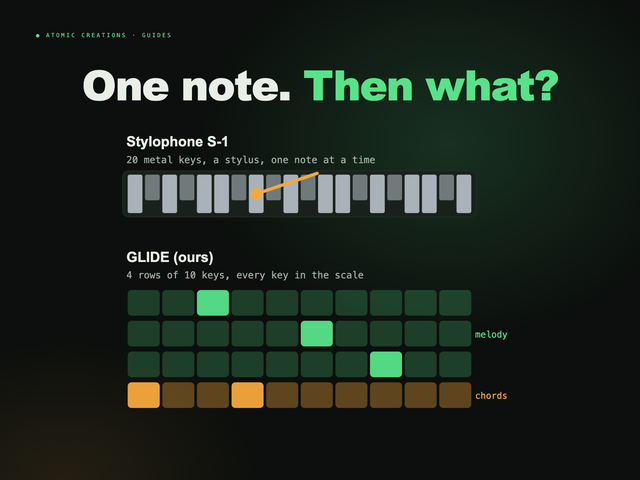
Full disclosure: this one is ours. We make GLIDE ($119.99), a synthesizer that turns a Cardputer ADV into a pocket instrument. Its keyboard becomes four rows that behave like strings, and notes slide into each other instead of jumping, so you can glide a chord shape across the keyboard like a fretless instrument. Scale lock is on by default, so every key is in key. Every unit has its own generated sounds, rolled from a seed unique to that device, so no two sound alike. Hold fn and K and the microphone listens to the song playing in the room, works out its key and retunes the instrument so you can play along.
It is a good example of what the microcontroller kind of pocket computer is best at: one job, on instantly, with nothing between your fingers and the sound. The GLIDE firmware is free for anyone who already owns a Cardputer ADV. You can play it right below, in your browser.
Useful? Pass it on
← Browse all guides